Build a multimodal search bar with discoverGPT's MCP tools
A step-by-step, vibe-coded build log — connect Claude to discoverGPT's MCP server, explore the catalog live, build a text + color search widget, and see it running right here.
Build a multimodal search bar with discoverGPT's MCP tools
This is a real build log, not a hypothetical — every command below was actually
run, every response below is real output from the shared demo catalog
(merchant 98334572911). By the end you'll have a working text + color search
widget, running live on this page, and know exactly how to drop the same
thing into your own storefront.
1. Connect Claude to the MCP server
discoverGPT exposes 40 tools over MCP at https://api.vairetail.com/mcp/sse,
authorized once through a browser consent screen — see
Authorization — connect once for the
full flow and config snippets for every major MCP host. Using Claude Code as
the concrete example, connecting takes one command:
claude mcp add --transport sse discovergpt https://api.vairetail.com/mcp/sseThen run /mcp inside Claude Code, choose discovergpt → Authenticate,
and approve in the browser popup — pick the shared demo merchant
(98334572911) when prompted. The tools stay connected and refresh
themselves from then on; you don't do this again.
2. Explore the catalog live
With the tools connected, the fastest way to learn the shape of the data is
to just call search_products_trimodal and look at what comes back.
Natural language:
search_products_trimodal(query_text="flowy floral midi dress for a summer wedding", limit=5)Real response, trimmed to 2 of the 5 results (each product also carries a
long HTML description, plus variant_id and jsonld fields, omitted here
for length):
{
  "discovery": [
    {
      "product_id": "15018404053359",
      "name": "Umgee Linen Botanical Print Tiered Midi Dress",
      "brand": "Trendsi",
      "category": "dresses",
      "images": [
        {
          "url": "https://cdn.shopify.com/s/files/1/0983/3457/2911/files/b3275e9b-6bbb-40fb-9e53-c21db3ce27ad-Max-Origin.webp?v=1783714183",
          "alt": null
        }
      ],
      "offers": [
        {
          "price_cents": 8799,
          "currency": "USD",
          "availability": { "in_stock": true, "stock_count": null }
        }
      ]
    },
    {
      "product_id": "15018312073583",
      "name": "Umgee Puff Sleeve Plaid Midi Dress",
      "brand": "Trendsi",
      "category": "dresses",
      "images": [
        {
          "url": "https://cdn.shopify.com/s/files/1/0983/3457/2911/files/58df9f87-7fa0-4680-ab92-a7e0fb93ae48-Max-Origin.webp?v=1783703506",
          "alt": null
        }
      ],
      "offers": [
        {
          "price_cents": 8499,
          "currency": "USD",
          "availability": { "in_stock": true, "stock_count": null }
        }
      ]
    }
  ],
  "transaction": [],
  "total": 5
}
Precise color, using structured HSV — {space: "hsv", values: [h, s, v]}:
search_products_trimodal(query_color={"space": "hsv", "values": [210, 64, 80]}, limit=3)Real response, trimmed to 2 of the 3 results:
{
  "discovery": [
    {
      "product_id": "15018321379695",
      "name": "Plus Size Notched Short Sleeve Textured Top",
      "brand": "Trendsi",
      "category": "tops",
      "images": [
        {
          "url": "https://cdn.shopify.com/s/files/1/0983/3457/2911/files/e369c21ea080484981af2ab581898be7-Max-Origin.webp?v=1783704544",
          "alt": null
        }
      ],
      "offers": [
        {
          "price_cents": 3699,
          "currency": "USD",
          "availability": { "in_stock": true, "stock_count": null }
        }
      ]
    },
    {
      "product_id": "15018377281903",
      "name": "Full Size Halter Neck Crop Top and Maxi Skirt Set Plus Size",
      "brand": "Trendsi",
      "category": "tops",
      "images": [
        {
          "url": "https://cdn.shopify.com/s/files/1/0983/3457/2911/files/0a014727-39d7-4073-8855-01370deca4c1-Max-Origin.webp?v=1783710889",
          "alt": null
        }
      ],
      "offers": [
        {
          "price_cents": 4799,
          "currency": "USD",
          "availability": { "in_stock": true, "stock_count": null }
        }
      ]
    }
  ],
  "transaction": [],
  "total": 3
}
Both calls return the same shape: a discovery array of products, each with
product_id, name, brand, category, images[].url, and
offers[].price_cents. That's the whole contract the widget below is built
from.
3. Vibe-code the component
Everything the UI needs is already visible in Step 2's output: a text field
for query_text, a color picker that produces an HSV triple for
query_color, and a results grid reading name / brand /
images[0].url / offers[0].price_cents off each result.
The actual prompt that produced it — typed into Claude right after Step 2's tool calls:
Build me a minimal React component for a Next.js/Fumadocs docs site. It needs:
- A text input for a natural-language search query
- A color picker (HSV) the user can optionally turn on alongside the text query
- A results grid showing each product's image, name, brand, and price
The data comes from
POST /api/demo-search, an existing route in this repo — send it{query_text?, query_color?, limit}and it returns{products: [{id, name, brand, price_cents, image}], mode}or{error}. Don't build a new backend route, just call that one.Keep it self-contained — this is for a tutorial, not a shared component. Match the site's existing Tailwind/dark-mode conventions if you can see them in other components.
The finished component — text input, an HSV color wheel, and a results grid,
nothing else — is SearchTutorialWidget.tsx in this docs site's own repo.
Text and color both route through the same tool shown above, which is
exactly why this pair was the one worth building first.
4. Wire it to a backend proxy
The component can't call api.vairetail.com directly from the browser — that
would mean putting a client_secret in client-side JavaScript, readable by
anyone who opens dev tools. Instead it calls a same-origin route,
/api/demo-search, which mints a short-lived token server-side (never
exposed to the browser) and forwards the search. This is the identical
pattern the Search API section documents for any REST
integration — a server-side token mint, then the real call.
5. See it live
This is that exact widget, running against the real demo catalog, right now:
Type a query, try a color, or both — every result on this page is a live
POST /v1/search call, the same thing search_products_trimodal does over
MCP.
6. Inject it into a real storefront
The search widget above is running inside this docs page. To prove the same
approach works on an actual commerce site, here it is dropped into
discovergpt.myshopify.com's theme — the same shared demo catalog, a real
Shopify store. That storefront sits behind Shopify's visitor password gate
(normal for a dev store) — the password is demo-store! if you want to
browse the general catalog. The injected widget itself, though, lives on a
new, unpublished preview theme rather than the live site, so you won't see
it there even with the password — the screenshot below is the real evidence
for that specific piece.
Since a Shopify theme doesn't run a React/Node backend of its own, this uses
a plain-JavaScript version of the same two calls — mint a token, then
search — added directly into the theme's layout/theme.liquid, right before
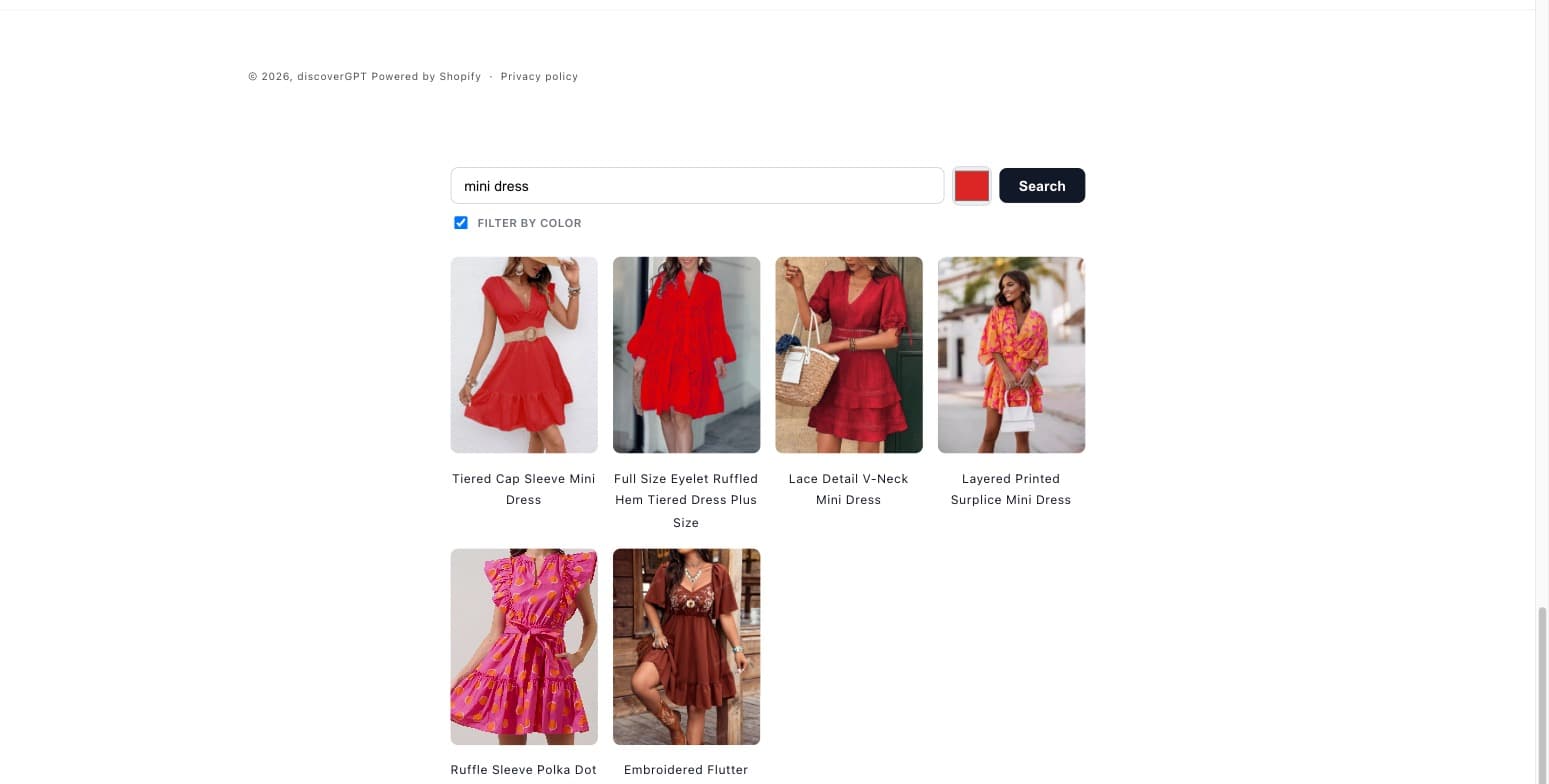
</body>. It's still multimodal: a native color swatch sits next to the
text input, and when "Filter by color" is checked its value gets converted
to HSV and sent alongside query_text in the same query_color shape
search_products_trimodal uses over MCP.
<div id="discovergpt-search" style="max-width:720px;margin:48px auto;padding:0 24px;font-family:system-ui,-apple-system,sans-serif;"></div>
<script>
(async function () {
  const root = document.getElementById('discovergpt-search');
  root.innerHTML = `
    <div style="display:flex;gap:8px;align-items:center;">
      <input id="dgpt-q" placeholder="Search…" style="flex:1;padding:10px 14px;border:1px solid #d1d5db;border-radius:8px;font-size:15px;outline:none;" />
      <input id="dgpt-color" type="color" value="#dc2626" style="width:42px;height:42px;padding:0;border:1px solid #d1d5db;border-radius:8px;cursor:pointer;" />
      <button id="dgpt-go" style="padding:10px 20px;border:none;border-radius:8px;background:#111827;color:#fff;font-size:15px;font-weight:600;cursor:pointer;">Search</button>
    </div>
    <label style="display:inline-flex;align-items:center;gap:6px;margin-top:8px;font-size:12px;font-weight:600;text-transform:uppercase;letter-spacing:.03em;color:#6b7280;cursor:pointer;">
      <input id="dgpt-color-on" type="checkbox" style="width:14px;height:14px;" />
      Filter by color
    </label>
    <div id="dgpt-results" style="display:grid;grid-template-columns:repeat(auto-fill,minmax(140px,1fr));gap:16px;margin-top:20px;"></div>
  `;

  // Native color input gives us a hex string; the API wants HSV.
  function hexToHsv(hex) {
    const r = parseInt(hex.slice(1, 3), 16) / 255;
    const g = parseInt(hex.slice(3, 5), 16) / 255;
    const b = parseInt(hex.slice(5, 7), 16) / 255;
    const max = Math.max(r, g, b);
    const min = Math.min(r, g, b);
    const d = max - min;
    let h = 0;
    if (d !== 0) {
      if (max === r) h = ((g - b) / d) % 6;
      else if (max === g) h = (b - r) / d + 2;
      else h = (r - g) / d + 4;
      h *= 60;
      if (h < 0) h += 360;
    }
    const s = max === 0 ? 0 : d / max;
    return [Math.round(h), Math.round(s * 100), Math.round(max * 100)];
  }

  async function search(queryText, colorOn, colorHex) {
    const tokenRes = await fetch('https://discovergpt-search.vercel.app/api/dev-token');
    const { access_token } = await tokenRes.json();
    const body = { limit: 6 };
    if (queryText) body.query_text = queryText;
    if (colorOn) body.query_color = { space: 'hsv', values: hexToHsv(colorHex) };
    const searchRes = await fetch('https://discovergpt-search.vercel.app/v1/search', {
      method: 'POST',
      headers: { Authorization: `Bearer ${access_token}`, 'Content-Type': 'application/json' },
      body: JSON.stringify(body),
    });
    const data = await searchRes.json();
    const results = document.getElementById('dgpt-results');
    results.innerHTML = (data.discovery || [])
      .map((p) => `
        <div style="text-align:center;">
          <img src="${p.images?.[0]?.url ?? ''}" style="width:100%;aspect-ratio:3/4;object-fit:cover;border-radius:8px;" />
          <div style="margin-top:6px;font-size:13px;color:#111827;">${p.name}</div>
        </div>
      `)
      .join('');
  }

  function runSearch() {
    search(
      document.getElementById('dgpt-q').value,
      document.getElementById('dgpt-color-on').checked,
      document.getElementById('dgpt-color').value
    );
  }

  document.getElementById('dgpt-go').addEventListener('click', runSearch);
  document.getElementById('dgpt-q').addEventListener('keydown', (e) => {
    if (e.key === 'Enter') runSearch();
  });
})();
</script>
This points at a demo backend — don't do this in production
discovergpt-search.vercel.app/api/dev-token mints a real (short-lived,
single-merchant, read-only) token, scoped only to the shared demo catalog.
It exists for exactly this kind of walkthrough. For your own storefront,
deploy your own copy of this token-minting proxy with your own
client_id / client_secret, scoped to your own merchant — see
Authentication for the credential flow, and reuse
this same two-call shape (mint, then search) against your own endpoint.
Live on a real Shopify store
The snippet above is quoted verbatim from what's actually deployed — it was
inserted into layout/theme.liquid and pushed as a new, unpublished preview
theme (discoverGPT MCP tutorial widget) on discovergpt.myshopify.com via
the Shopify CLI, without touching the live Dawn theme. The store's
browser-based theme code editor had a reproducible Shopify admin bug at the
time — the sections sidebar and toolbar stuck loading — so the snippet was
pushed with theme pull / theme push --unpublished instead of pasting it
in directly. The screenshot below is from that live preview: a real
multimodal search — text query "mini dress" combined with the red color
swatch (query_color from the same picker, converted to HSV) — returning
real images and product names from the shared demo catalog, with the
network tab confirming 200s from discovergpt-search.vercel.app and no CORS
errors.